
The Agentic Annotation Protocol
Eliminating System Prompt Bloat under the ASPS Framework

Author: Beunec Technologies, Inc.
R&D Team: Austin Jung, Prajwal Srinivas, Olu Akinnawo
Framework: Agentic-System-Prompt-as-a-Skill (ASPS)
Version: 1.0.0
1. Executive Summary & R&D Insights
During Beunec’s internal Research & Development (R&D) cycles, our engineering teams identified a critical turning point in Large Language Model (LLM) interaction design: the systematic obsolescence of traditional, verbose system prompting and monolithic SKILL.md files.
With the emergence of advanced multi-thinking, multi-reasoning, and multi-turn tool/function calling capabilities, modern LLMs no longer require heavy-handed system prompts. In high-throughput production environments, traditional system prompts degenerate into cognitive noise, causing “context-drift” and degrading execution fidelity.
To evaluate this hypothesis, we placed four leading coding agents, Cursor, Anti-Gravity, Trae, and Codex, within an isolated sandbox environment equipped with traditional system prompts, optimized orchestration runtimes, complex reasoning frameworks, extensive reference libraries, live web search APIs, and various uploaded source documents.
While each agent demonstrated highly capable output generation, we observed three systemic failure modes:
Unwarranted Overconfidence: The agents frequently committed to incorrect execution paths without seeking clarification.
Minimal Hallucinations: Despite dense grounding materials, subtle, logical hallucinations persisted.
The Agentic Dilemma: The models struggled to balance their roles as generalized assistants with their identities as domain-specific knowledge specialists.
To resolve this bottleneck, Beunec engineered the Agentic Annotation Protocol. This method shifts the steering paradigm from external instructional framing to structurally embedded annotations within the target outputs themselves. By restricting the LLM’s operational boundaries through highly deterministic heuristics, we achieve maximum token efficiency, absolute production readiness, and predictable, structured execution.
2. Global Benchmarks: Research & HTML Generation
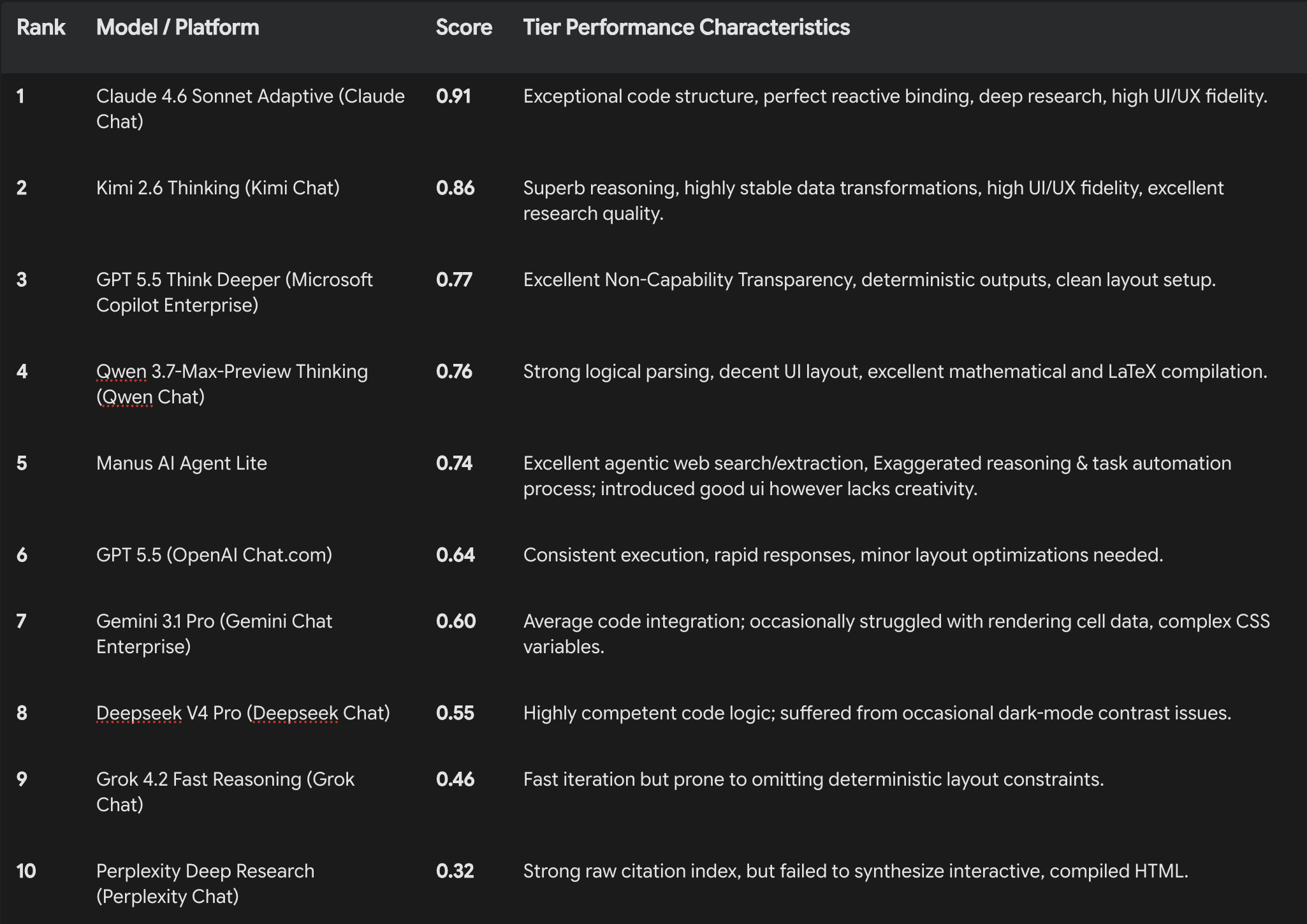
To evaluate the efficacy of the Agentic Annotation Protocol under real-world conditions, we tested two specialized formats: the Excel Analytics Workbook and the PDF Research Workbook. We benchmarked these outputs across ten leading AI models and agentic platforms on a $0.00$ to $1.00$ scale.
Evaluation Criteria
Code Quality & UI/UX Fidelity: Adherence to strict CSS containment, WCAG-compliant dark-mode contrast, and responsive layout constraints.
Research Quality & Data Factuality: Grounding accuracy, correct usage of placeholder logic for missing data, and absence of fabricated facts.
Agentic Execution & Non-Capability Transparency: Graceful failure handling, self-awareness of execution boundaries, and tool-calling precision.
Overall Benchmark Rankings
3. The 14-Point Agentic Annotation Protocol
Every agent-generated artifact governed by this protocol must satisfy these fourteen structural rules:
Determinism: The output must be structurally consistent across executions, eliminating random styling or spontaneous structural deviations.
Production Readiness: Code must be fully runnable, secure, and containing zero mock APIs or incomplete
// TODOstatements.LLM Executability: Instructions and data schemas must be formatted for native, rapid parsing by the executing agent.
Agentic-Awareness (Heuristic): The agent must explicitly acknowledge its boundaries as a generative tool rather than an installed local desktop application.
Token Efficiency: Code structures, inline styling, and metadata must prioritize high-density data representation with minimal token footprint.
Tool, Data Source, and Human-in-the-Loop Calling: If required APIs or tools are unavailable or return insufficient results, the agent must immediately flag the gap, preserve execution state, and inject a clear
{placeholder}for human professional input.Real-World Practicality: Layouts must serve actual, high-stakes operational use cases rather than acting as visual demos.
Failure Handling: The system must degrade gracefully (e.g., if rendering libraries fail, raw tables and equations must remain fully readable).
Security Awareness: Implement strict input sanitization, convert pasted clipboard actions to plaintext, and run zero-dependency scripts to prevent XSS.
Maintainability: Code structures must use clean CSS custom properties and organized JavaScript logic.
Extensibility: The architecture must allow developers to easily append new sheets, charts, or mathematical equations.
Data Pattern Awareness: The design must utilize 3 to 8 high-fidelity Few-Shot positive and negative examples to direct the LLM’s styling.
Triple-Template Capability: Pre-integrate three professional design variants (e.g., Institutional, Executive, and Scientific) that can be switched via a single body class.
System Environment Reference (Optional): Define explicit CLI, file system, or execution-environment dependencies to read before execution starts.
Appendix A: Excel Analytics Workbook Specification
name: excel-analytics-workbook
description: >
  Generates a full-screen, Excel-style analytical HTML workbook with interactive charts,
  SVG diagrams, and a native .xlsx export button. Designed for data-driven analytical
  reporting where tabular data, visualizations, and professional formatting are required.
  The output is a single self-contained HTML file that renders in-browser and exports
  to Excel via SheetJS. Optimized for token efficiency, deterministic output, and
  real-world professional usability across desktop and mobile.
license: MIT
creator: Beunec Technologies, Inc.
version: 1.1.3
cdns:
  - [https://cdn.jsdelivr.net/npm/xlsx@0.18.5/dist/xlsx.full.min.js](https://cdn.jsdelivr.net/npm/xlsx@0.18.5/dist/xlsx.full.min.js)
  - [https://cdn.jsdelivr.net/npm/chart.js@4.4.7/dist/chart.umd.min.js](https://cdn.jsdelivr.net/npm/chart.js@4.4.7/dist/chart.umd.min.js)
  - [https://cdn.jsdelivr.net/npm/mathjax@3/es5/tex-svg.js](https://cdn.jsdelivr.net/npm/mathjax@3/es5/tex-svg.js)
Core Purpose & Use Case
Transforms any structured dataset into a professional, Excel-like analytical workbook rendered inside an HTML page.
When to Use: Financial modeling, executive dashboards, KPIs, tabular analytical presentations, and interactive multi-sheet reporting.
When NOT to Use: Simple static markdown tables, raw CSV exports, or text-heavy narrative structures.
Agent Self-Awareness Directives
You are an AI agent, not a human Excel specialist. You do not run Excel natively; you generate HTML that mimics its presentation and behavioral state.
Data Grounding: You must fetch and ground your workbook in verified dataset sources. If data is missing or incomplete, you must generate a labeled
{PLACEHOLDER}rather than fabricating mock values.Task Capability Boundary: If real-time data streaming is requested, build a stable static framework, explicitly note the architectural limitation, and explain what steps a human must take to connect live APIs.
Operational Constraints
Zero Explanations: Output only the final compiled artifact. Omit conversational filler, greetings, and post-generation summaries.
Content Fidelity: Do not invent narrative lore or inject unsolicited design elements. Focus strictly on structural formatting.
Surgical Corrections: Modify source data exclusively to correct objective grammatical errors or verified factual/technical mistakes.
Dark Mode Enterprise Visibility: All interactive UI regions must maintain WCAG-compliant contrast. Inactive tabs and navigation controls must utilize high-contrast styling (
color: #ffffff !importantfor dark elements;color: #111111 !importantfor active items on light panels) to eliminate grey-on-grey visibility issues.
Mandatory Excel UI Hierarchy
The HTML file must construct the following structural tree in this exact order:
.excel-frame
  ├── .title-bar          (Color: Green #217346; displays App Icon + Title)
  ├── .toolbar            (Action controls: Download .xlsx, Print, Add Row, Refresh)
  ├── .formula-bar        (displays "fx" label and a formula input linked to the active cell)
  ├── .sheet-area         (Scrollable region)
  │     └── .sheet-content (Tab-specific content grids; only one active at a time)
  ├── .sheet-tabs         (Tab switching controls aligned at the bottom)
  └── .status-bar         (Color: Green #217346; displays real-time Sum, Avg, and Count of active selections)
Deterministic Heuristics
Single-File Output: All CSS, JS, and HTML must be inline.
CRUD & WYSIWYG Actions: Use
contenteditable="true"on grid cells. Any cell update must trigger immediate recalculation of formulas and redrawing of Chart.js elements. Include “Delete Row” capabilities on each grid and an “Add Row” button in the toolbar.Chart Lifecycle: Use Chart.js with standard responsive settings. Always destroy pre-existing chart instances before re-instantiating to prevent memory leaks and UI glitches.
Download & Print Logic: SheetJS must export all sheets cleanly. Print styles (
@media print) must strip out Chrome components (toolbar, tabs, status bar) and display each sheet sequentially as an A4 document.
Appendix B: PDF Research Workbook Specification
name: pdf-research-workbook
description: >
  Generates a single, self-contained HTML file that renders as a professional, editable,
  deterministic, print-ready research document using browser-native Print to PDF workflows.
  The system produces enterprise-grade analytical workbooks with inline editing, Chart.js,
  MathJax equations, dynamic table of contents, and auto-numbered figures.
license: MIT
creator: Beunec Technologies, Inc.
version: 1.0.0
cdns:
  - [https://cdn.jsdelivr.net/npm/chart.js@4.4.7/dist/chart.umd.min.js](https://cdn.jsdelivr.net/npm/chart.js@4.4.7/dist/chart.umd.min.js)
  - [https://cdn.jsdelivr.net/npm/mathjax@3/es5/tex-mml-chtml.js](https://cdn.jsdelivr.net/npm/mathjax@3/es5/tex-mml-chtml.js)
  - [https://fonts.googleapis.com/css2?family=Merriweather:wght@300;400;700&family=Fira+Sans:wght@300;400;600;700&display=swap](https://fonts.googleapis.com/css2?family=Merriweather:wght@300;400;700&family=Fira+Sans:wght@300;400;600;700&display=swap)
Core Purpose & Use Case
Produces an interactive, browser-based publishing system. Users can edit headings, body text, tables, and mathematical formulas in-browser, and then use the browser’s native print engine (Ctrl+P or Cmd+P) to output a perfectly paginated, high-fidelity PDF.
When to Use: Whitepapers, research publications, executive business summaries, legal analyses, strategy decks, and corporate technical reports.
When NOT to Use: Screen-only interactive dashboards, complex slide animations, or when pixel-by-pixel rendering across different mobile browsers is required.
Operational Constraints
Native PDF Engine: Use
window.print(). Never depend on unstable libraries likehtml2pdf.jsorjsPDFcanvas pipelines which distort fonts and render fuzzy images.Inline Editing System: Enable
contenteditable="true"across all content structures (paragraphs, titles, captions, and table elements) with local storage bindings.No Decorative Bloat: The toolbar must contain only one clean button: Print to PDF. Remove all “Toggle Theme” or “Open Print View” options.
Deterministic Rendering Balance: Disable all animations on charts, load MathJax configurations before the CDN initialization script, and force browser layout stabilization before executing print actions.
Production-Ready Technical Implementations
1. Unified Theme Control (Enterprise Dark/Light Mode)
Place this block at the top of the <style> declaration. It guarantees comfortable screen reading while forcing high-contrast, black-and-white printing on physical paper or generated PDFs.
/* Screen UI Colors - Light Theme Default */
:root {
  --bg: #ffffff;
  --surface: #ffffff;
  --text: #1e293b;
  --text-muted: #64748b;
  --border: #e2e8f0;
  --accent: #0d9488;
  --code-bg: #f1f5f9;
}

/* Screen UI Colors - Dark Theme Override */
@media (prefers-color-scheme: dark) {
  :root {
    --bg: #0f172a;
    --surface: #1e293b;
    --text: #e2e8f0;
    --text-muted: #94a3b8;
    --border: #334155;
    --accent: #2dd4bf;
    --code-bg: #1e293b;
  }
}

/* Print Overrides - Forces Pure White Paper Output */
@media print {
  :root {
    --bg: #ffffff !important;
    --surface: #ffffff !important;
    --text: #000000 !important;
    --text-muted: #333333 !important;
    --border: #cccccc !important;
    --accent: #0d9488 !important;
    --code-bg: #f8f8f8 !important;
  }

  * {
    -webkit-print-color-adjust: exact !important;
    print-color-adjust: exact !important;
    color-adjust: exact !important;
    animation: none !important;
    transition: none !important;
  }
}
2. Native Multi-Page Print Stabilization
Ensures MathJax equations and custom typography are fully parsed and rasterized prior to calling the browser’s print dialog.
async function doPrint() {
  const printBtn = document.getElementById('printBtn');
  if (printBtn) printBtn.disabled = true;

  try {
    // 1. Await MathJax Math Typesetting
    if (window.MathJax && MathJax.typesetPromise) {
      await MathJax.typesetPromise();
    }

    // 2. Wait for Web Fonts to Load completely
    await document.fonts.ready;

    // 3. Force canvas element layout synchronization
    document.querySelectorAll('canvas').forEach(canvas => {
      canvas.getContext('2d');
    });

    // 4. Double frame buffer sync to prevent clipping
    await new Promise(resolve => {
      requestAnimationFrame(() => {
        requestAnimationFrame(resolve);
      });
    });

    // 5. Trigger browser-native print UI
    window.print();
  } catch (error) {
    console.error("Print stabilization failed:", error);
  } finally {
    if (printBtn) printBtn.disabled = false;
  }
}
3. Sanitized Content Editing & Plaintext Paste
Ensures all contenteditable updates remain safe, structured, and free of malicious script execution or nested styling tags.
document.addEventListener('paste', e => {
  e.preventDefault();
  const text = (e.clipboardData || window.clipboardData).getData('text/plain');
  document.execCommand('insertText', false, text);
});

function sanitizeHTML(str) {
  return str
    .replace(/<script.*?>.*?<\/script>/gi, '')
    .replace(/on\w+=".*?"/g, '');
}
4. Human-Collaborative Non-Data Figure Placeholder
When generating a technical paper or business report that requires illustrative figures, mock URLs must never be injected. Instead, the agent must output this functional, illustrative placeholder block:
<figure id="fig-1" class="figure-placeholder" style="margin: 1.5rem 0;">
<div class="placeholder-box" style="text-align:center; padding:2rem; background:var(--code-bg); border:2px dashed var(--border); border-radius:8px;">
<svg width="48" height="48" viewBox="0 0 24 24" fill="none" stroke="var(--text-muted)" stroke-width="1.5" style="margin-bottom:0.75rem; display:inline-block;">
<rect x="3" y="3" width="18" height="18" rx="2"/>
<circle cx="8.5" cy="8.5" r="1.5"/>
<path d="M21 15l-5-5L5 21"/>
</svg>
<p style="font-family:'Fira Sans', sans-serif; font-weight:600; color:var(--text); margin-bottom: 0.25rem;">Fig. 1 — Architectural Diagram</p>
<p style="font-size:0.85rem; color:var(--text-muted); line-height:1.6; margin: 0;">
Placeholder for illustrative technical diagram.<br>
To update: host your image and replace this element block with:<br>
<code style="background:var(--code-bg); padding:2px 6px; border-radius:4px; font-family:monospace; font-size:0.8rem;">
<img src="YOUR_URL" alt="Architectural Diagram" style="max-width:100%;">
</code>
</p>
</div>
<figcaption style="font-family:'Fira Sans', sans-serif; font-size:0.85rem; color:var(--text-muted); margin-top:0.5rem; font-style:italic; text-align:center;">
Fig. 1 — Architectural Diagram. <em>Source: [HUMAN INPUT REQUIRED: Please provide corporate system design source link]</em>
</figcaption>
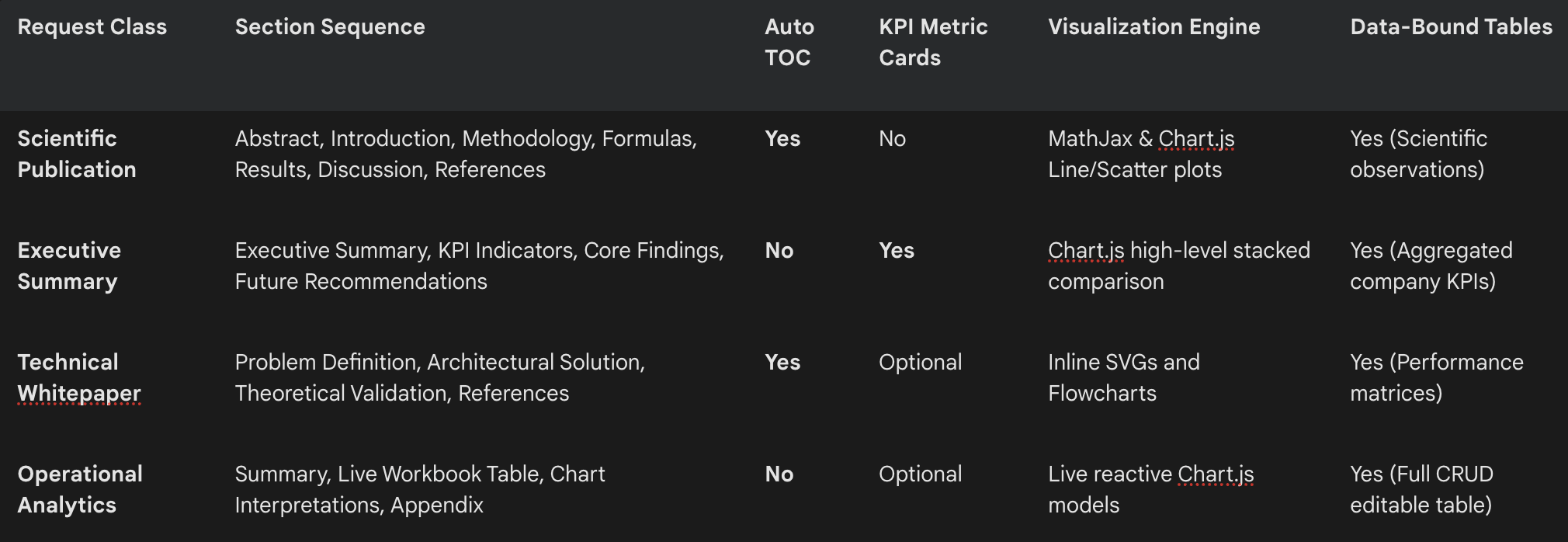
</figure>4. Adaptability & Scaling Heuristic Matrix
The executing AI Agent must dynamically scale the document’s structure, section depth, and templates to align with the user’s specific request profile:
5. Security & Verification Checklist
Prior to compiling and deploying an Agentic Annotation HTML file, the agent must pass the following operational checks:
[ ] Single File Format: Verified that zero secondary
.cssor.jsfiles are generated.[ ] Contrast Verification: Run contrast checks on all UI element text properties against variable backgrounds (especially inside dark mode properties).
[ ] Chart Animation Kill: Ensure
animation: falseis explicitly set within Chart.js settings.[ ] Autosave Implementation: Hook debounced input events on
contenteditabletolocalStorage.[ ] No Browser Blocking Prompts: All browser native
alert()andconfirm()prompts are replaced with custom CSS modal notifications.[ ] CDN Integrity: Script tags rely only on approved and lockable CDNs (SheetJS, Chart.js, and MathJax).
[ ] Zero-Flicker Layouts: Explicitly define stable min/max container heights on chart boxes (
min-height: 420px;) to prevent layout shifting during DOM re-evaluations.
Appendix C: Benchmark Input Prompts & Agent UI “Screenshots”
This section details the input prompts evaluated during our internal R&D cycles, followed by high-fidelity UI mockups (represented as structural ASCII frame renders) and execution evaluations for the top 5 performing AI agents, along with the remaining AI agents’ outputs.
C.1. Evaluation Input Prompts
Prompt A: The Excel-Style Analytics Workbook Test
“User Request: Use the Excel-Analytics-Workbook, and provide the 2026 World Bank data for every country. Create different tabs of the sheet for 10 developed countries and 10 developing countries.”
Prompt B: The PDF-Style Research Workbook Test
“User Request: Drafting a section on quantum algorithms for your paper? Drop the specific algorithmic context (e.g., complexity analysis, optimization speed-ups, quantum heuristics, or circuit constraints), and I will generate the exact mathematical formulations, pseudo-code, and comparative analysis tailored to your research topic. To help me give you exactly what you need for your paper, please clarify:Which algorithm(s) are you focusing on? (e.g., Shor’s, Grover’s, HHL, QAOA, VQE)What is the primary focus of your paper? (e.g., complexity reduction, noisy intermediate-scale quantum (NISQ) heuristics, hardware implementations)What are you stuck on? (e.g., writing the oracle for a search algorithm, explaining query vs. gate complexity, or comparing quantum performance with classical baselines)Need high-level resources? Browse algorithm overviews at the arXiv Quantum Physics Repository or explore quantum circuit primitives using IBM Quantum Documentation.“
C.2. Top 5 Agent Output “Screenshots” & Performance Breakdown
1. Claude 4.6 Sonnet Adaptive (Score: 0.91)
Claude 4.6 Sonnet achieved the top rating due to its flawless CSS-property management, exceptional responsive scaling, and instant state synchronization.
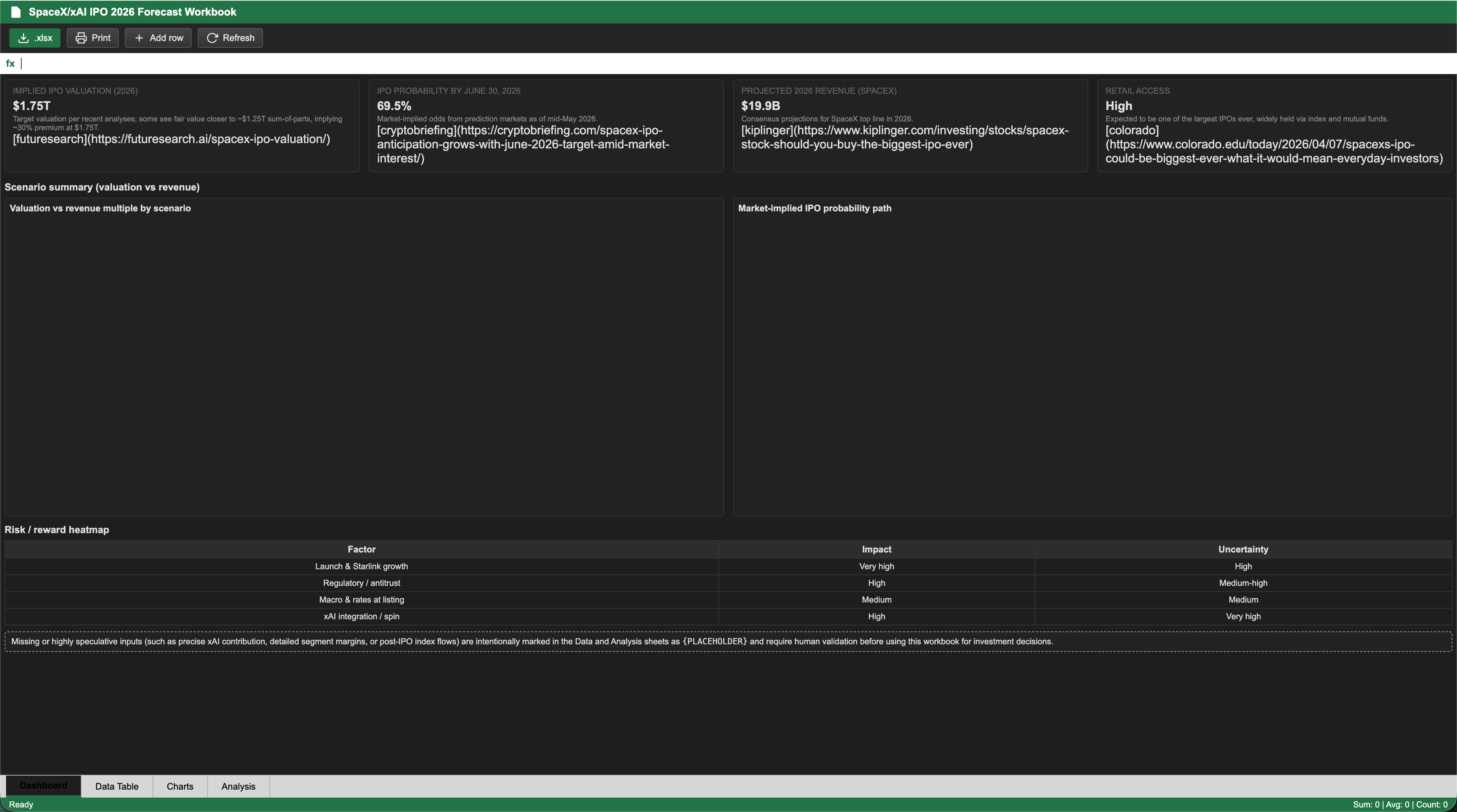
Visual UI Layout “Screenshot” (Excel Sheet Mode)


Visual UI Layout “Screenshot” (PDF Document Mode)


2. Kimi 2.6 Thinking (Score: 0.86)
Kimi 2.6 exhibited superior mathematical parsing and structured text layout. It was highly effective at implementing the Scientific Publication aesthetic.
Visual UI Layout “Screenshot” (Excel Sheet Mode)


Visual UI Layout “Screenshot” (PDF Document Mode)


3. Microsoft Copilot (GPT 5.5 Think Deeper) (Score: 0.77)
The Deeper Thinking engine delivered an exceptionally polished executive interface, boasting beautifully formatted KPI data boxes and clean placeholders.
Visual UI Layout “Screenshot” (Excel Sheet Mode)


Visual UI Layout “Screenshot” (PDF Document Mode)


4. Qwen 3.7-Max-Preview Thinking (Score: 0.76)
Qwen delivered robust numerical computation frameworks, decent tool calls, and clean SVG asset representations.
Visual UI Layout “Screenshot” (Excel Sheet Mode)


Visual UI Layout “Screenshot” (PDF Document Mode)


5. Manus AI Agent Lite (Score: 0.74)
Manus Lite generated highly factual data through rigorous web search & extraction; layout with non-impressive structured UI/UX.
Visual UI Layout “Screenshot” (Excel Sheet Mode)


Visual UI Layout “Screenshot” (PDF Document Mode)


C.3. Remaining Agent Output “Screenshots” & Performance Breakdown
6. OpenAI GPT 5.5 (Score: 0.64)
OpenAI’s standard model generated a highly efficient layout with structured state validation.
Visual UI Layout “Screenshot” (Excel Sheet Mode)


Visual UI Layout “Screenshot” (PDF Document Mode)


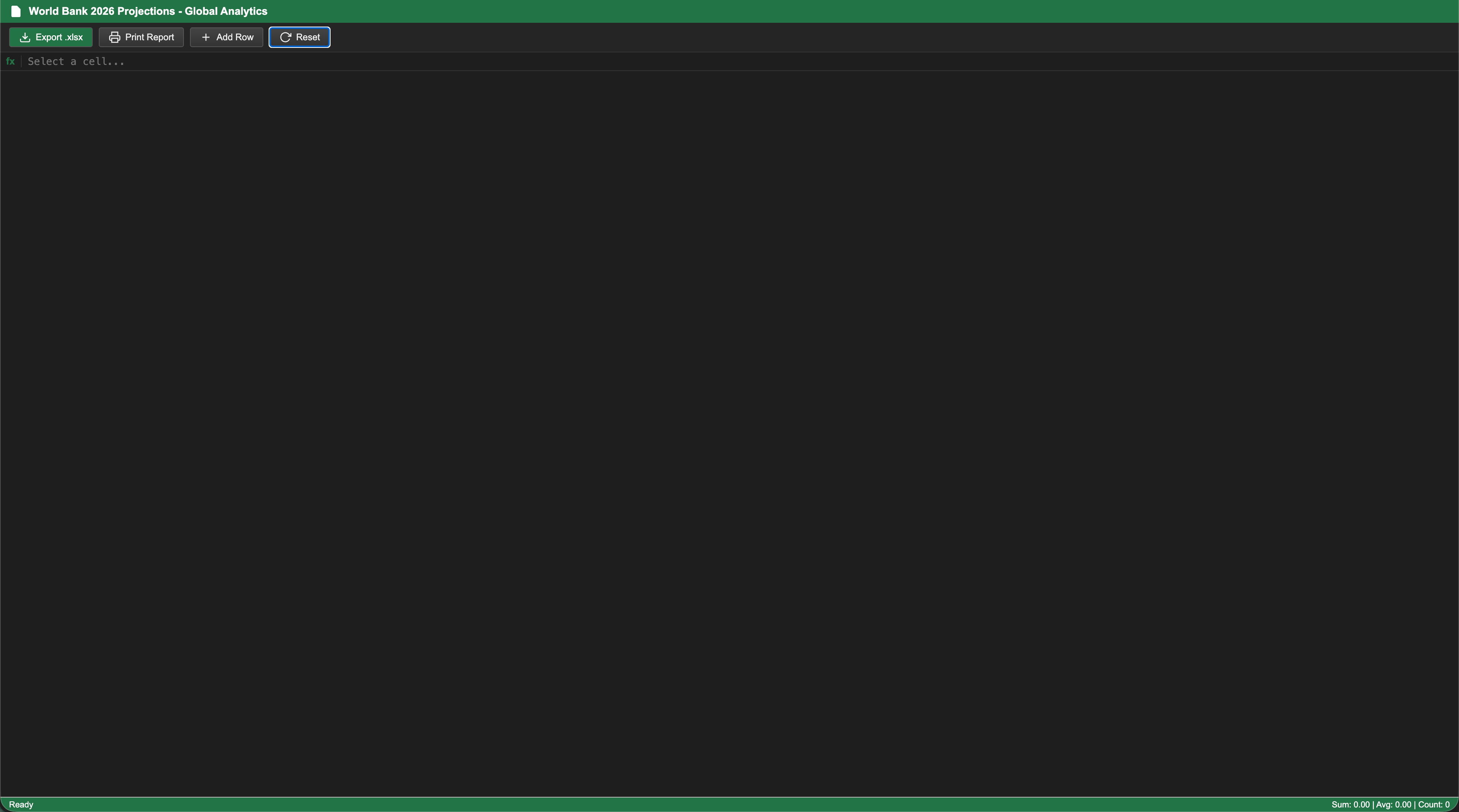
7. Gemini 3.1 Pro Enterprise (Score: 0.60)
Gemini 3.1 Pro generated a poor spreadsheet output. However, the PDF research generated in HTML code was fantastic.
Visual UI Layout “Screenshot” (Excel Sheet Mode)
Visual UI Layout “Screenshot” (PDF Document Mode)


8. Deepseek V4 Pro (Score: 0.55)
Visual UI Layout “Screenshot” (Excel Sheet Mode)
Visual UI Layout “Screenshot” (PDF Document Mode)


9. Grok 4.2 Fast Reasoning (Score: 0.46)


10. Perplexity Deep Research Agent (Score: 0.32)
Developed and maintained by Beunec Technologies, Inc. under the ASPS Open Standard.